PRODUCT UPDATES

Argus keeps
getting smarter.

Every release adds new skills, integrations and modeling power to your AI agent inside Revit. Here's the full story — newest first.

17 updates shipped
4 years of momentum
July 18 latest release
2026
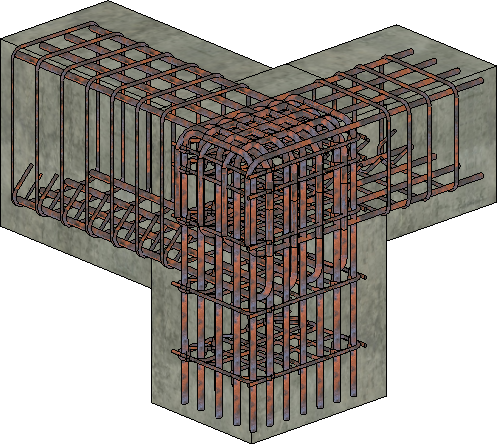
Beam-column joint modeled in Revit with rebar generated by Argus — longitudinal bars, stirrups and ties in concrete members MAJOR RELEASE
Modeling Jul 18, 2026 LATEST

Rebar modeling skill

Argus can now generate reinforcement for columns, beams, foundations, floors and walls. Describe what you need in plain language, or attach a drawing or PDF instruction — Argus reads the spec and models the rebar, longitudinal bars and stirrups included, directly in your Revit model.

#skills#rebar#structure#modeling
Learn more →
Argus chat showing structural elements rendered as a sortable data table with Element ID, Name and Category columns
Assistant Jul 7, 2026

Results shown as sortable data tables

When Argus returns tabular results such as schedules, counts, or element lists, they now render as a proper interactive data table in the chat instead of plain text. Reviewing and exporting model data is far easier.

#chat#reporting#tables
Argus permission prompt asking to allow run_code — read files and write files — with Allow all or Deny options
Security Jul 4, 2026

Argus asks before reading or writing files on your computer

Argus now asks for your approval before it reads or writes files on your computer or runs generated code. Allow it for the rest of the chat or deny a single call — you stay fully in control of what the assistant can do in your environment.

#security#permissions#safety
Argus command panel showing a run error with a one-click Fix with AI button
Commands Jul 3, 2026

Built-in command code editor with 'Fix with AI'

Saved commands can be opened and edited directly in an in-app code editor, complete with a one-click 'Fix with AI' button that repairs errors for you. You no longer need to regenerate a command from scratch to make a change.

#commands#editor#ai
Read the docs →
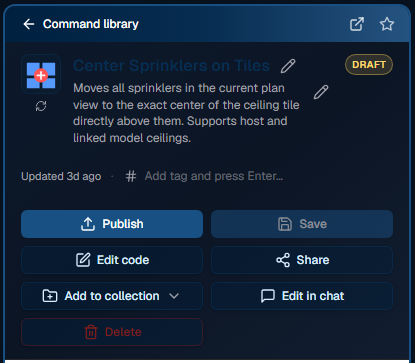
A saved Argus command — Center Sprinklers on Tiles — open in the command library with Publish, Edit code, Share and Add to collection actions
Commands Jun 29, 2026

Pop a saved command into its own window

Any saved command can be popped out into a standalone window so it stays available while you keep working in Revit and in chat. Ideal for commands you run repeatedly.

#commands#interface#productivity
Modeling Jun 11, 2026

MEP graph modeling support

Argus can now reason about connected mechanical, electrical, and plumbing systems as a network rather than isolated elements, unlocking real MEP modeling tasks.

#mep#modeling
Annotation Jun 10, 2026

Smarter automatic tagging and annotation
A new smart tagging engine places and rearranges tags and annotations with better spacing and far fewer overlaps. Views come out clean with almost no manual cleanup.

#tagging#annotation#dimensioning
Read the docs →
Argus integrations menu with Connect Microsoft 365 and Connect Autodesk options
Integrations May 29, 2026

Autodesk Construction Cloud & Platform Services integration

Argus connects to Autodesk Platform Services / ACC, including a recursive project folder search with wildcard patterns. You can pull documents and data straight from your cloud project into the assistant.

#acc#aps#integration#cloud
Commands May 26, 2026

Share commands publicly with your team

Publish commands publicly so your whole team can reuse them, and edit any command straight from the chat. Automation built by one person becomes available to everyone.

#commands#sharing#collaboration
Assistant May 16, 2026

On-demand Skills framework

Argus now loads specialized skills only when a task needs them, replacing the old manual agent-mode toggle. The assistant automatically brings in the right expertise — dimensioning, tagging, retail layouts, and more — without you switching modes.

#skills#assistant
Files & docs May 15, 2026

Attach files to your chat

Attach files directly to a conversation so Argus can read and work with them — reference documents, data, and specs become usable inputs to any task.

#files#attachments#chat
Commands May 15, 2026

Shareable command collections

Organize saved commands into collections and share those collections with teammates, so teams can standardize on a common set of automations.

#commands#collections#sharing
Argus integrations menu with Connect Microsoft 365 and Connect Autodesk options
Integrations May 8, 2026

Microsoft 365 integration

Argus connects to Microsoft 365, letting it access and work with your organization's Microsoft cloud data and documents from inside Revit.

#m365#integration
Assistant May 6, 2026

Switch between assistants

An assistant switcher lets you pick the right specialized agent for the job and move between Argus modes without losing your place.

#assistant#interface
Files & docs Apr 30, 2026

Upload and read PDFs and documents

Argus can process uploaded PDFs and other documents, extracting the information it needs to complete a task. Spec sheets and reference PDFs become usable inputs.

#files#pdf#documents
Files & docs Apr 24, 2026

Knowledge base explorer

A file-based knowledge-base explorer lets Argus browse reference material to ground its answers and generated code in the right documentation.

#knowledge-base#search
THE ROAD TO ARGUS
  1. APR 2026 Argus launches

    BIMLOGIQ Copilot evolves into Argus — a game-changing AI agent built on everything Copilot learned. Same mission, a fundamentally more capable assistant.

  2. JUL 2024 Shareable, versioned command library

    Commands became a team asset: share them with colleagues, star favorites, and keep versions as they evolve. Automation built by one engineer became reusable across the whole team.

  3. FEB 2024 Save Command — reusable commands

    Turn a successful AI action into a saved, reusable command instead of re-describing the task every time. The moment the tool shifted from one-off answers to a personal automation library.

  4. MAY 2023 AI code generation for Revit goes live

    The first working backend: describe a task in plain language and it generates and runs Revit API code for you. This is the foundation the whole product grew from.

Building AI for Revit since 2022 — and counting

Want these updates working for your team?

Argus ships improvements like these continuously — your workflows get faster without lifting a finger.