All updates MONTHLY RECAP

July 2026

9 updates shipped to Argus this month, including a major release — here's the full recap.

9 updates shipped
6 areas improved
1 major release
Assistant 3 Commands 2 Annotation 1 Modeling 1 Files & docs 1 Security 1
THE HEADLINER

Biggest release of the month

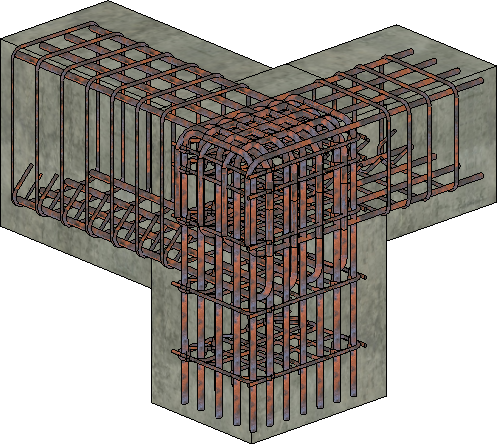
Beam-column joint modeled in Revit with rebar generated by Argus — longitudinal bars, stirrups and ties in concrete members
MAJOR RELEASE Modeling Jul 18, 2026

Rebar modeling skill

Argus can now generate reinforcement for columns, beams, foundations, floors and walls. Describe what you need in plain language, or attach a drawing or PDF instruction — Argus reads the spec and models the rebar, longitudinal bars and stirrups included, directly in your Revit model.
#skills#rebar#structure#modeling
Learn more →
ALSO SHIPPED

8 more improvements

Assistant Jul 28

Team usage dashboard

Owners and Admins get a dashboard showing how their team uses Argus — including the most-used commands — so you can see where the assistant is saving the most time.

#teams#dashboard#admin
Files & docs Jul 24

Attach Markdown and Excel macro workbooks

The chat now accepts Markdown files (.md) and macro-enabled Excel workbooks (.xlsm) as attachments, alongside the formats Argus already reads.

#attachments#files
Assistant Jul 22

Mention Revit elements with @

Type @ in the chat to mention a Revit element, type or view directly, so Argus knows exactly which one you mean instead of guessing from names.

#chat#mentions
Annotation Jul 21

Smarter automatic dimensioning

Ask Argus to dimension a view: standard plans and sections are annotated in one pass, and custom selections are dimensioned intelligently — all placed as a single undoable action.

#dimensioning#annotation
Commands Jul 21

Starred command on the Revit ribbon

Pin your starred command straight to the Revit ribbon and launch it without opening the Argus panel — your most-used automation is now one click away.

#commands#ribbon#productivity
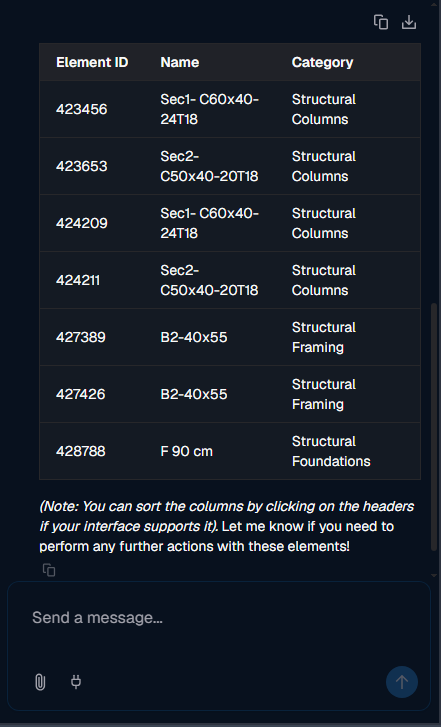
Argus chat showing structural elements rendered as a sortable data table with Element ID, Name and Category columns
Assistant Jul 7

Results shown as sortable data tables

When Argus returns tabular results such as schedules, counts, or element lists, they now render as a proper interactive data table in the chat instead of plain text. Reviewing and exporting model data is far easier.

#chat#reporting#tables
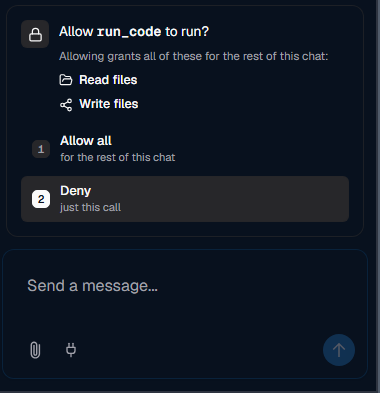
Argus permission prompt asking to allow run_code — read files and write files — with Allow all or Deny options
Security Jul 4

Argus asks before reading or writing files on your computer

Argus now asks for your approval before it reads or writes files on your computer or runs generated code. Allow it for the rest of the chat or deny a single call — you stay fully in control of what the assistant can do in your environment.

#security#permissions#safety
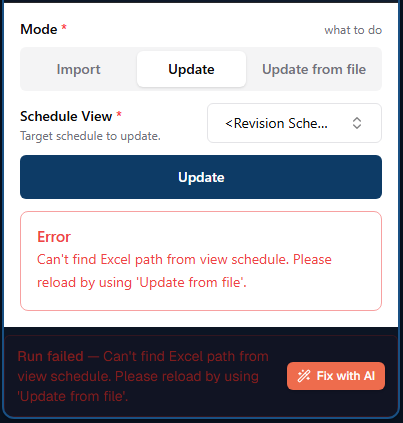
Argus command panel showing a run error with a one-click Fix with AI button
Commands Jul 3

Built-in command code editor with 'Fix with AI'

Saved commands can be opened and edited directly in an in-app code editor, complete with a one-click 'Fix with AI' button that repairs errors for you. You no longer need to regenerate a command from scratch to make a change.

#commands#editor#ai
Read the docs →

Want these updates working for your team?

Argus ships improvements like these every month — your workflows get faster without lifting a finger.